Property research
Enter an address. Get the property details and surroundings in one place.


How it works
Enter the address
One address is the whole input. There is nothing to upload and nothing to look up first.
Read the property and its surroundings
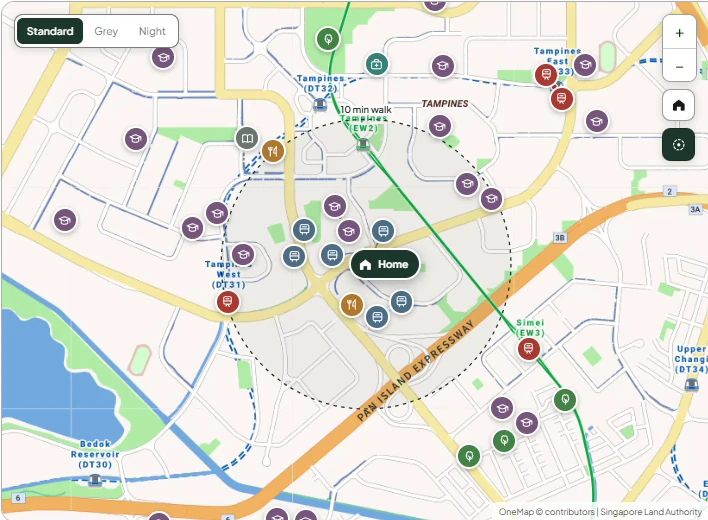
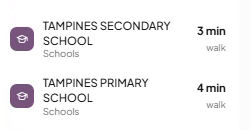
The details, the recent transactions and what is planned nearby, with schools, amenities and transport alongside them, each with walking routes and journey times.
Power the next step
The research identifies and ranks the property’s strongest selling points, and supplies the information behind other Plinth features, including client briefs, agent decks and video scripts.
Why it matters
Research once, use it across your work. You should not have to look up the same property details every time you prepare a brief, build a deck or write a script.
How Plinth helps
Enter an address, and Plinth gathers the research that your other materials build on. Property facts, nearby amenities and recent transactions carry through into the features that need them, saving you from starting again each time.
All sources are verified and shown alongside the information, so you can see where each detail comes from.
Client briefs & agent decks
Turn the research into a personalised client brief and an agent deck.

How it works
Explain what matters to them
Plinth organises and explains the research around your client’s profile. Nearby schools might mean convenience for a family, while for an investor the same schools point to rental demand.
Track their activity
See which brief sections they opened, how long they spent and when they returned.
Follow up with better timing
Use their activity to decide what to discuss, and spot renewed interest even from a lead who went quiet months ago.
Why it matters
The same property fact can mean different things to different clients. Personalisation means choosing the relevant information and explaining how it relates to their needs.
Tracking helps you follow up after the brief is sent. A client who keeps returning to purchase costs gives you a reason to ask about financing. Someone spending time on schools gives you an opening to discuss their family’s priorities.
A distant response on a call may simply mean you caught someone at the wrong time. Tracking lets you look for renewed interest before reaching out again. A lead who went quiet months ago might return to the brief and revisit several sections, which gives you a timely reason to reconnect with something relevant to discuss.
How Plinth helps
Plinth uses the client information you provide to select, organise and explain the property research in your client brief and agent deck. Choose from multiple themes without designing the materials from scratch, and a built in chatbot in the brief lets clients ask questions as they read.
Share the brief through a private link, then review section views, time spent and return visits. See what drew their attention and whether they have come back after a quiet period, so you can prepare both the subject and the timing of your next follow up.
News
Keep relationships active. Give clients a reason to recommend you.

How it works
Stay informed automatically
Plinth gathers and summarises relevant stories from Singapore property and general news websites, with the sources linked for you to review.
Connect each update to the right clients
News is matched to clients based on where they live, turning local developments into personal reasons to reconnect.
Make every message relevant
Receive individual drafts that explain what the news means for each client, using their profile and circumstances to shape the message.
Why it matters
Referrals and repeat business depend on relationships that last beyond the transaction. Staying in touch is part of that, but the value is in having something relevant to say.
A mass forwarded article leaves the client to work out why it matters. A personal message connects the development to their home and circumstances, explains what it could mean and gives them something useful to consider. It shows you are still paying attention after the sale.
That is the relationship Plinth helps you maintain: one where clients have a reason to return to you, and to recommend you to someone else.
How Plinth helps
Plinth handles the work behind a thoughtful follow up: monitoring news, identifying relevant developments, matching them to clients and drafting individual messages.
Each draft draws on the information you have provided about the client. A new transport connection, for example, could be discussed in terms of everyday convenience for an owner occupier, or tenant appeal for an investor. The explanation changes with the person receiving it.
Messages introduce the news and its source, explain its relevance and suggest things to watch. You review, edit and send, with the groundwork already done, which makes personal follow ups practical across your whole client base.
Questions agents ask
Research and data
- What does Plinth find for a Singapore property address?
- Can I see HDB resale prices near a flat?
- Does Plinth show condo and EC transactions from URA?
- Which primary schools are within 1 km, and what does that mean for P1 registration?
- How does Plinth work out the walk to the nearest MRT?
- Does Plinth show future plans and new developments near a property?
- Can Plinth calculate stamp duty, ABSD and the cash a buyer needs?
- What ABSD rates does Plinth use in 2026?
- Does Plinth check LTV, TDSR and MSR loan limits?
- Does Plinth work for rental listings?
Client briefs and follow-up
- How do I make a client brief for a property viewing?
- Can I change how a client brief looks?
- Can I see if a client opened and read my brief?
- Can buyers ask questions inside the brief?
- How do clients open a brief, and can I update or stop the link?
- How does Plinth help me follow up with past clients using property news?
- Does Plinth keep a list of my clients?
- How should I follow up with a property buyer after a viewing?
Conversations and live help
- What does Conversations do?
- Which Singapore property rules can live help answer?
- Can an HDB owner sell before the MOP, or buy a condo before selling the flat?
- Does Conversations understand Singlish and Mandarin words?
- Do I need the client's consent to record a call?
- Which plans include Conversations?